archiveFeb 9, 2021
ARM Assembly 1
ARM instruction layout, labels, AREA/ENTRY/END, BL-based subroutines, and switching between ARM and Thumb with CODE32/CODE16 and BX.
ARM instruction layout
{
	label
}
{
	instruction
||
	directive
||
pseudo-instruction
} {; comment}- Even without a label, instructions, pseudo-instructions, and directives must start with whitespace (space or tab).
Case rule
- Instruction, directive, and symbolic register names may be all uppercase or all lowercase, but not mixed.
Line length
- Long lines can wrap with
\. - Nothing may follow the backslash on that line.
Label
- A symbol that stands for an address.
- The assembler computes the address during assembly.
- It measures the label relative to the origin of the section where the label is defined.
- References to labels in the same section can use PC plus or minus an offset — program-relative addressing.
Local label
- A subclass of labels.
- Local labels start with a number in the range 0–99.
- Unlike ordinary labels, you can define the same local label more than once.
- That helps when macros generate labels.
- When the assembler sees a local-label reference, it binds it to a nearby instance of that local label.
Comment
- The first semicolon on a line starts a comment, unless it sits inside a string constant.
- The end of the line ends the comment.
- A line that is only a comment is still valid.
- The assembler ignores all comments.
ARM instruction format
AREA     ARMtest, CODE, READONLY
                                ; name this code block ARMtest
        ENTRY                   ; mark the first instruction to run
start
        MOV      r0, #10        ; set parameters
        MOV      r1, #3
        ADD      r0, r0, r1     ; r0 = r0 + r1
stop
        MOV      r0, #0x18      ; angel_SWIreason_ReportException
        LDR      r1, =0x20026   ; ADP_Stopped_ApplicationExit
        SWI      0x123456       ; ARM semihosting SWI
        END                     ; Mark end of file
ELF sections and the AREA directive
-
An ELF section is an independent, named, indivisible run of code or data.
-
You need at least one code section to build an application.
-
Assembly or compile output may include:
- One or more code sections, usually read-only
- One or more data sections, usually read-write, sometimes zero-initialized
-
The linker places each section into the program image under its placement rules.
-
Adjacent sections in a source file are not necessarily adjacent in the image.
-
In ARM assembly sources, a section starts with the
AREAdirective. -
That directive names the section and sets its attributes.
-
Attributes follow the name, comma-separated.
ENTRY directive
- Marks the first instruction to execute.
- In apps that include C, the entry point also lives in the C library startup code.
- Initialization code and exception handlers carry entry points as well.
Application start
- Execution begins at the
startlabel. - Decimal 10 and 3 load into r0 and r1.
- Those registers are added; the sum lands in r0.
Application terminate
- After the main code, the app returns control to the debugger and exits.
- That uses the ARM semihosting SWI with the parameters shown above.
END directive
- Tells the assembler to stop processing this source file.
- Every assembly language source module must end with
ENDon its own line.
Calling subroutines
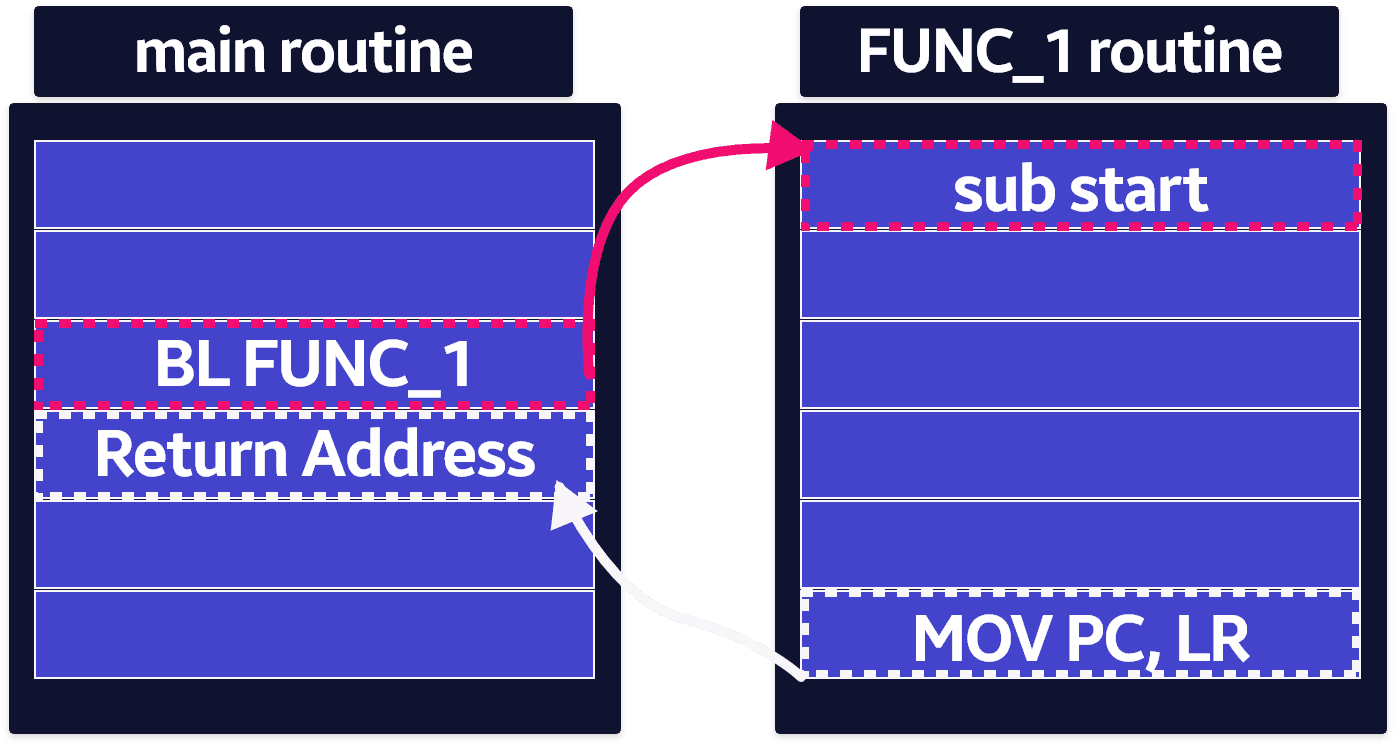
- Call a subroutine with branch-and-link:
BL destinationdestinationis usually a label on the subroutine's first instruction.- It can also be a program-relative or register-relative expression.
Branch instructions
B (Branch == Jump)
BL
- Puts the return address in link register r14 (lr).
- Sets the PC to the subroutine address.
BX (Branch and Exchange)
BLX (Branch with Link and Exchange)
Branch : B{<cond>} label
Branch with Link : BL{<Cond>} sub routine label- After the subroutine runs, return with the usual move of lr into pc.
- By convention, r0–r3 carry parameters in and results back out.
MOV pc, lrAREA subRoutTest, CODE, READONLY
ENTRY
start MOV r0, #10
MOV r1, #3
BL apple ; Call subroutine
stop MOV r0, #0x18 ; angel_SWIreason_ReportException
LDR r1, =0x20026 ; ADP_Stopped_ApplicationExit
SWI 0x123456 ; ARM semihosting SWI
apple ADD r0, r0, r1 ; Subroutine code
MOV pc, lr ; Return from subroutine
END ; Mark end of fileThumb and ARM assembly
AREA ThumbArm, CODE, READONLY
        ENTRY
        CODE32                          ; following instructions are ARM
header  ADR     r0, start + 1           ; processor starts in ARM state
        BX      r0                      ; tiny ARM header
                                        ; call Thumb main program
        CODE16                          ; following instructions are Thumb
start
        MOV     r0, #10
        MOV     r1, #3
        BL      apple
stop
        MOV     r0, #0x18               ; angel_SWIreason_ReportException
        LDR     r1, =0x20026            ; ADP_Stopped_ApplicationExit
        SWI     0xAB                    ; Thumb semihosting SWI
apple
        ADD     r0, r0, r1              ; Subroutine code
        MOV     pc, lr                  ; Return from subroutine
        END                             ; Mark end of file
CODE32 and CODE16
- Direct the assembler to emit ARM (
CODE32) or Thumb (CODE16) instructions. - They do not assemble into runtime state-change ops.
- Only the assembler's state changes.
BX
- A branch that can change processor state at runtime.
- The low bit of the target address distinguishes ARM vs Thumb instructions.