archiveJun 2, 2020
Windows PE File Format
Walkthrough of the Portable Executable layout using calc.exe: DOS header, NT headers, optional header fields, data directories, and section characteristics.
Windows executable structure
PE file (Portable Executable)
- A PE file is a nest of large structures packed with metadata.
- It holds many tables and member fields.
PE file types
| Type | Description |
|---|---|
| EXE | Executable |
| SCR | Executable (screensaver) |
| DLL | Library |
| OCX | Library (ActiveX) |
| SYS | System driver |
| OBJ | Object file |
- SCR files are executables. People miss that and get hit by malware that ships as a screensaver.
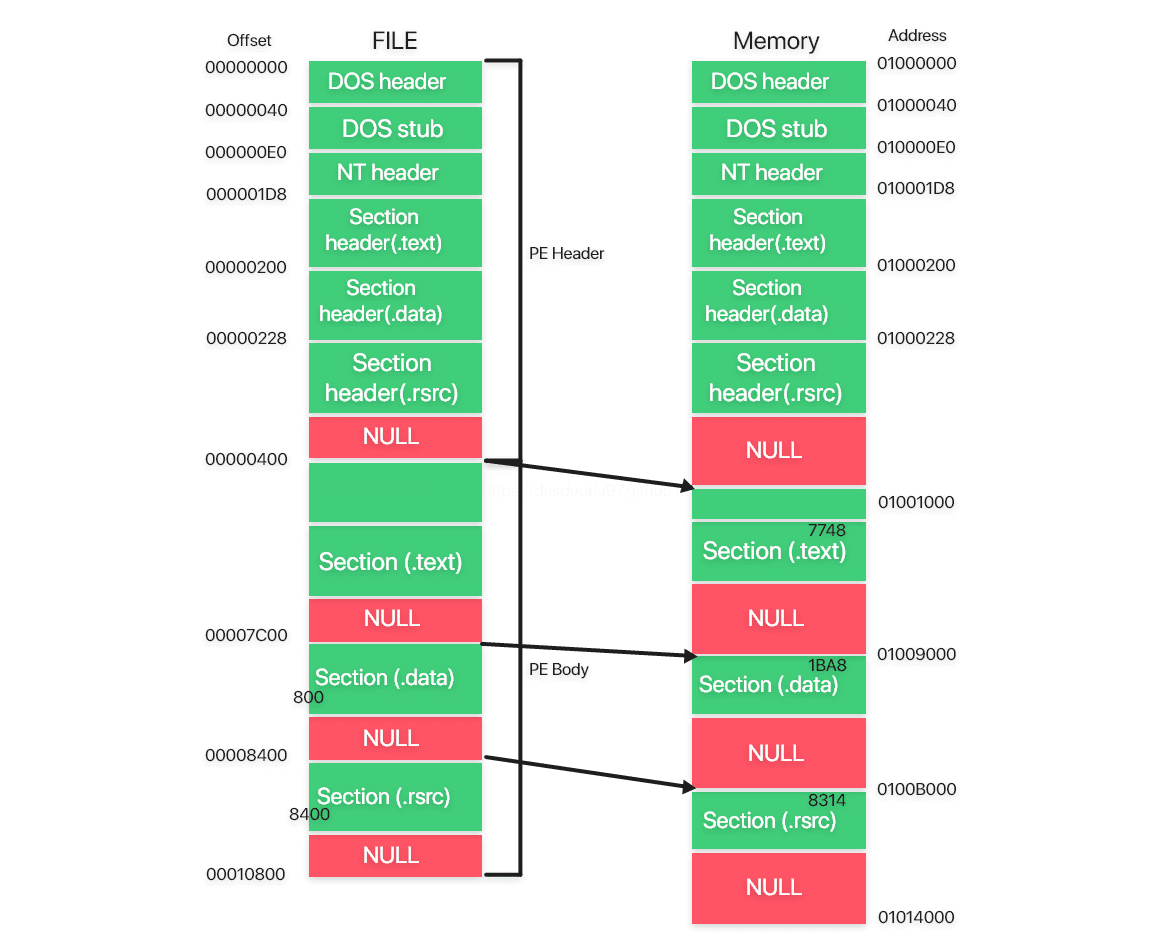
- Addressing starts at the first byte. On disk and in memory, the layout is not the same.
- On disk you talk in file offsets from byte zero.
- In memory you use VA (Virtual Address) and RVA (Relative Virtual Address).
- Relative addresses exist because a PE is not guaranteed to load at one fixed base every time.
- Images usually grow a bit once mapped: Section Alignment is typically larger than File Alignment.
- Alignment pads structures to fixed boundaries so the loader and CPU can work efficiently.
- Some sections have size 0 on disk and expand only after they land in memory.
Analyzing calc.exe
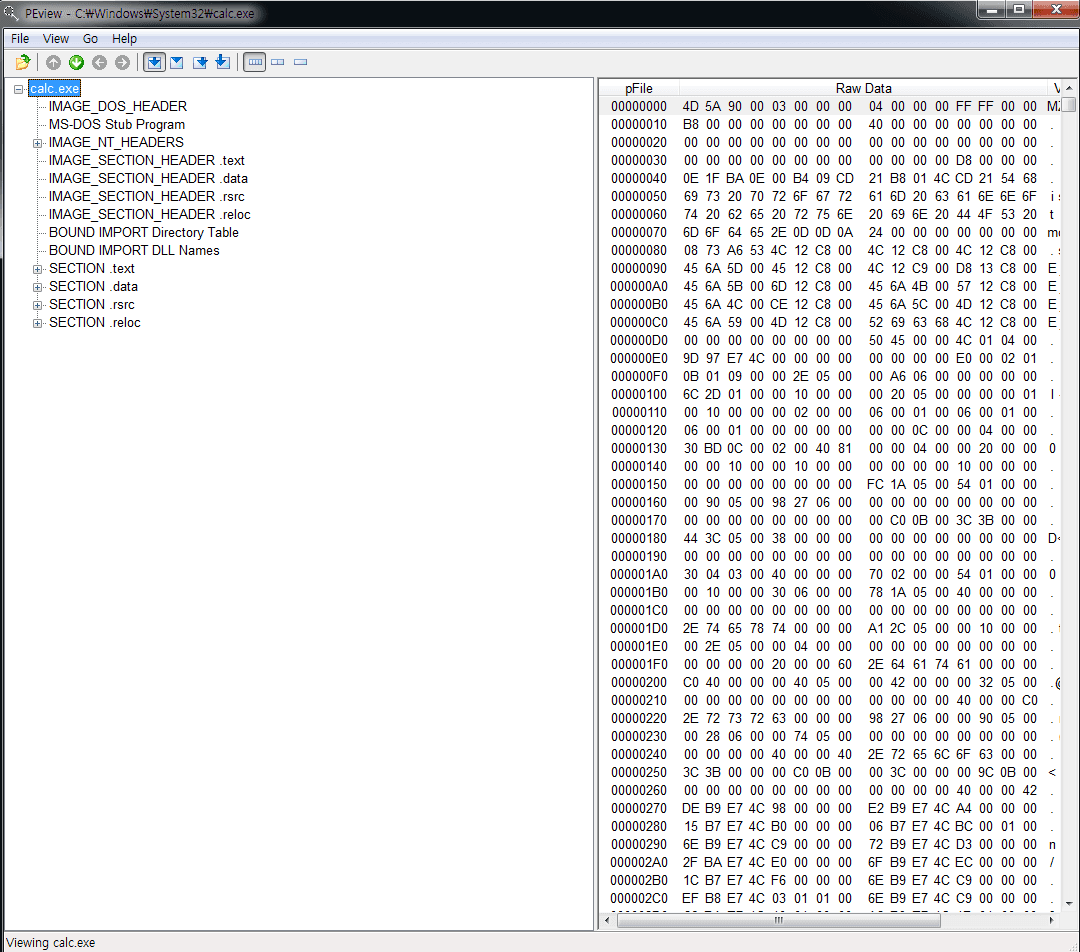
IMAGE_DOS_HEADER and DOS Stub
- The first 40 bytes are the DOS header. Stub code exists for DOS, not modern Windows.
- The header is there so a PE still has a defined behavior if someone runs it under DOS.
typedef struct _IMAGE_DOS_HEADER {              // DOS header
        WORD    e_magic;                        // Magic number
        WORD    e_cblp;
        WORD    e_cp;
        WORD    e_crlc;                         // Relocations
                                                // ...
        WORD    e_res2[10];                     // Reserved words
        LONG    e-lfanew;                       // File address of new exe header
} IMAGE_DOS_HEADER, *PIMAGE_DOS_HEADER // winNT.h- In practice you mostly care about
e_magicande_lfanew. The rest mattered more when DOS was common.
e_magic
- Think of it as the file signature. The first two bytes are fixed as
MZ(5A4D) and mark a PE candidate. - If those bytes are not
MZ, the loader will not treat the file as PE.

e_lfanew
- Offset where the NT headers begin.
- In calc.exe it points straight at the NT header block.


DOS Stub
- Sits right under the DOS header. Most PEs include it, but execution does not depend on it.
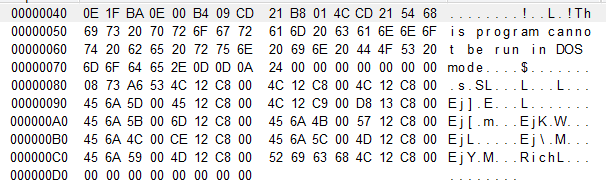
- The stub is 16-bit code, so it will not run on 32-bit Windows. As the embedded string says, it only prints that the program cannot run under DOS.
IMAGE_NT_HEADERS
- Starts with the four-byte signature
"P E \0 \0", thenFileHeaderandOptionalHeader.
IMAGE_NT_HEADERS32
typedef struct _IMAGE_NT_HEADERS {
        DWORD Signature;
        IMAGE_FILE_HEADER FileHeader;
        IMAGE_OPTIONAL_HEADER32 OptionalHeader;
} IMAGE_NT_HEADERS32, *PIMAGE_NT_HEADERS32;
IMAGE_FILE_HEADER
typedef struct _IMAGE_FILE_HEADER {
        WORD            Machine;
        WORD            NumberOfSections;
        DWORD           TimeDataStamp;
        DWORD           PointerToSymbolTable;
        WORD            SizeOptionalHeader;
        WORD            Characteristics;
} IMAGE_FILE_HEADER, *PIMAGE_FILE_HEADER;
Machine
- Target CPU platform.
- Constants live in
WinNT.h. Day-to-day files are usually Intel 386, Intel 64, or ARM.
#define IMAGE_FILE_UKNOWN               // 0
#define IMAGE_FILE_MACHINE_I386         // 0x014c Intel 386
#define IMAGE_FILE_MACHINE_R3000        // 0x0162 MIPS
#define IMAGE_FILE_MACHINE_ARM          // 0x01c0 ARM
#define IMAGE_FILE_MACHINE_IA64         // 0x0200 Intel 64
NumberOfSections
- How many sections the file contains.
- Section count varies by binary, so the header has to say.
SizeOfOptionalHeader is the size of the optional header that follows.
Characteristics
- Flags that describe the PE, including whether it is a DLL or an EXE.
- The stored value is the OR of matching attributes.
#define IMAGE_FILE_EXECUTABLE_IMAGE             0x0002
// File is executable
#define IMAGE_FILE_32BIT_MACHINE                0x0100
// 32 bit word machine.
#define IMAGE_FILE_DLL                          0x2000
// File is a DLL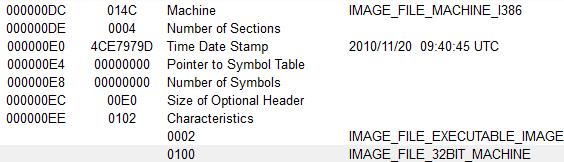
- This sample is an Intel x86 binary.
- It has four sections.
- Characteristics
0x102=0x100 + 0x002.
IMAGE_OPTIONAL_HEADER
typedef struct _IMAGE_OPTIONAL_HEADER {
  **WORD                 Magic;**
  BYTE                 MajorLinkerVersion;
  BYTE                 MinorLinkerVersion;
  DWORD                SizeOfCode;
  DWORD                SizeOfInitializedData;
  DWORD                SizeOfUninitializedData;
  DWORD                AddressOfEntryPoint;
  DWORD                BaseOfCode;
  DWORD                BaseOfData;
  DWORD                ImageBase;
  DWORD                SectionAlignment;
  DWORD                FileAlignment;
  WORD                 MajorOperatingSystemVersion;
  WORD                 MinorOperatingSystemVersion;
  WORD                 MajorImageVersion;
  WORD                 MinorImageVersion;
  WORD                 MajorSubsystemVersion;
  WORD                 MinorSubsystemVersion;
  DWORD                Win32VersionValue;
  DWORD                SizeOfImage;
  DWORD                SizeOfHeaders;
  DWORD                CheckSum;
  WORD                 Subsystem;
  WORD                 DllCharacteristics;
  DWORD                SizeOfStackReserve;
  DWORD                SizeOfStackCommit;
  DWORD                SizeOfHeapReserve;
  DWORD                SizeOfHeapCommit;
  DWORD                LoaderFlags;
  DWORD                NumberOfRvaAnds;
  IMAGE_DATA_DIRECTORY DataDirectory[IMAGE_NUMBEROF_DIRECTORY_ENTRIES];
} IMAGE_OPTIONAL_HEADER32, *PIMAGE_OPTIONAL_HEADER32;
Magic
- Distinguishes Optional Header 32 from 64.
- 32-bit uses
0x10B, 64-bit uses0x20B.

AddressOfEntryPoint
- RVA of the first instruction after the image is mapped.
- The PE loader adds this to
ImageBaseto find the real start.

SectionAlignment, FileAlignment
- Alignment for memory and for the file. Leftover bytes in a section are padded with zeros.
- Each section size must be a multiple of the matching alignment.

Subsystem
- Runtime environment.
- System drivers (
.sys) use0x1, most GUI Windows apps use0x2, console CLI apps use0x3.

DataDirectory
NumberOfRvaAndSizescan set the count, but binaries almost always ship the usual 16 directories.
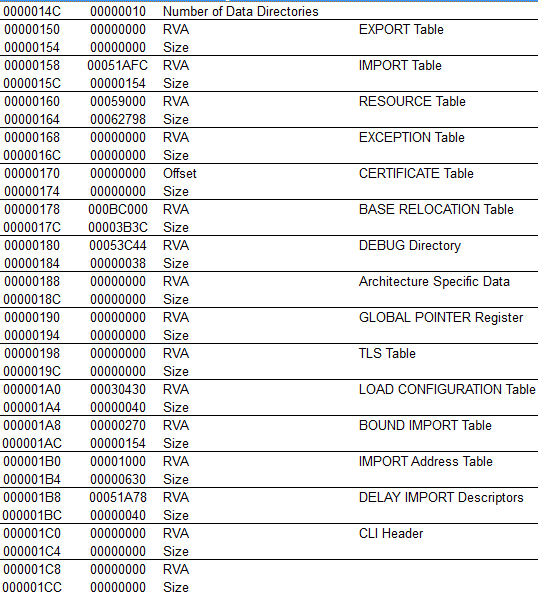
- Sixteen directory entries, each with its own payload.
- The last directory is unused today.
Export Directory
- Holds the info a DLL needs so other modules can call its exported functions.
Import Directory
- Names the DLLs this program imports, plus INT/IAT addresses for the functions it needs.
- The loader fills the IAT with real addresses at runtime. That wiring is involved.
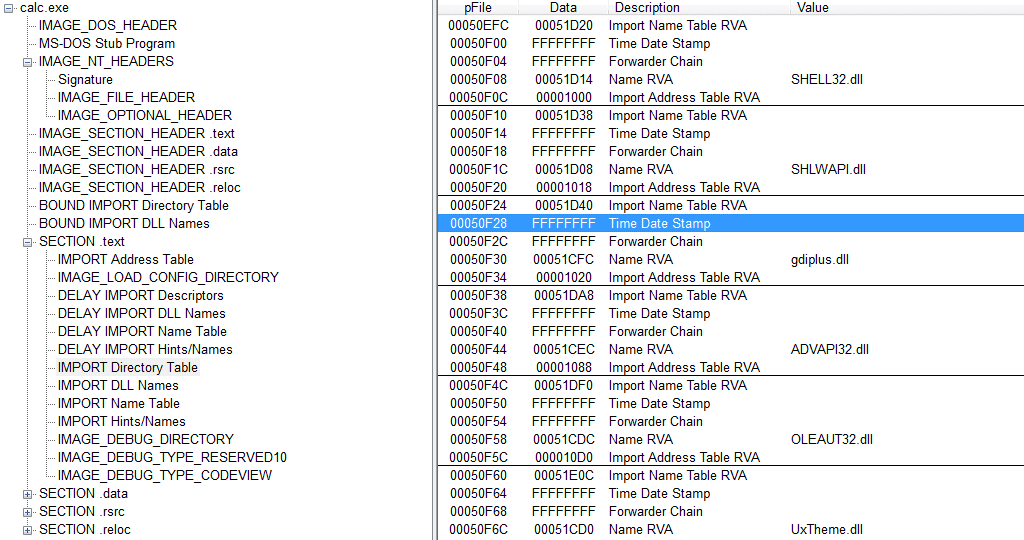
- When resolving an external DLL function, the loader consults the export table, then writes the address into the import address table through the import machinery.
Section Header
- Sections hold the real file contents. Each section has a header describing itself.
typedef struct _IMAGE_SECTION_HEADER {
        BYTE  Name[IMAGE_SIZEOF_SHORT_NAME];
        union {
                DWORD PhysicalAddress;
                DWORD VirtualSize;
        } Misc;
        DWORD VirtualAddress;
        DWORD SizeOfRawData;
        DWORD PointerToRawData;
        DWORD PointerToRelocations;
        DWORD PointerToLinenumbers;
        WORD  NumberOfRelocations;
        WORD  NumberOfLinenumbers;
        DWORD Characteristics;
} IMAGE_SECTION_HEADER, *PIMAGE_SECTION_HEADER;
VirtualSize, VirtualAddress: size and address in memory
SizeOfRawData, PointerToRawData: size and offset on disk
Characteristics: per-section flags
| Value | Description |
|---|---|
| IMAGE_SCN_MEN_READ 0x40000000 | The section can be read. |
| IMAGE_SCN_MEM_WRITE 0x80000000 | The section can be written to. |
| IMAGE_SCN_MEM_EXECUTE 0x20000000 | The section can be executed as code. |
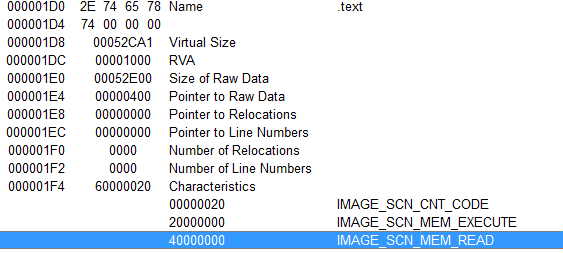
- From the headers you can read each section's size and location.
.textholds code and is readable and executable.